
BTTR is independent. We may earn a commission if you buy through our links. Why trust us?
LG's Smart Monitor Swing promises convenience and visual excellence as a movable big screen monitor with TV smarts. But the software and the touchscreen don't always play nice, and it needs a longer power cable than the one in the box.
- Unique rolling stand is movable and easily positioned
- Responsive 4K UHD IPS touchscreen display
- Built-in webOS for PC-free TV streaming and apps
- Needs power, and the supplied power cable is too short
- Limited 60Hz refresh rate limits gaming appeal
- webOS is slow and not all apps are optimised for the touchscreen
A couple of years ago, LG unveiled its StanbyME portable TV, and it was a breath of fresh design air in a typically stale big black rectangle market.
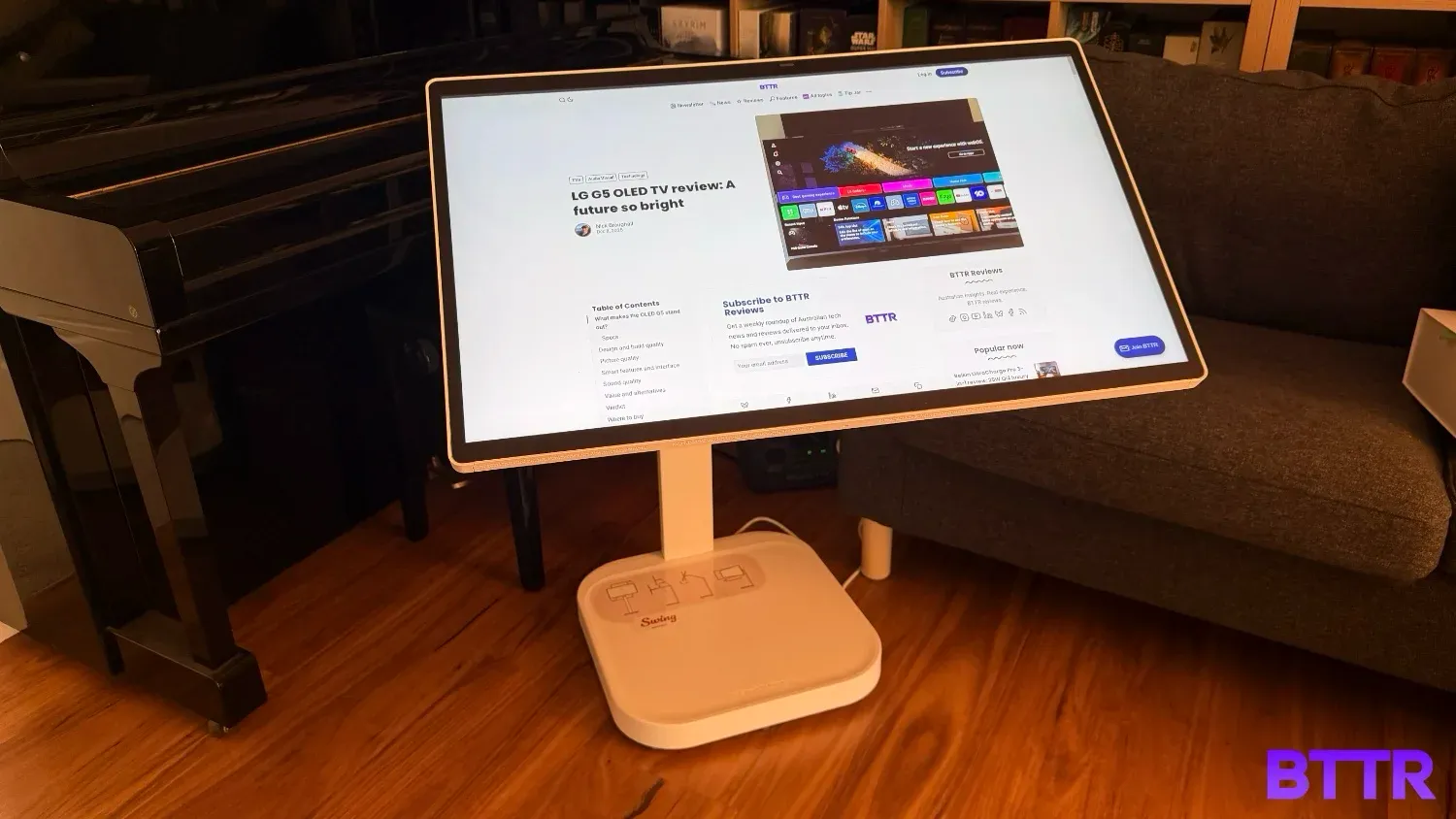
The Smart Monitor Swing is the monitor version of the StanbyME. It doesn’t include a TV tuner or a battery, but it offers a large 31.5-inch 4K screen on a pedestal stand that can be easily wheeled around the home or office.
The stand offers a reasonable amount of flexibility in terms of orientation and positioning, which gives it a unique selling point.
And because it is a smart monitor, you still get a lot of the digital entertainment options you would expect from a smart TV, like streaming apps and wireless games streaming access.
The best word to describe the Smart Monitor Swing is niche. It’s not going to be for everyone, but for an office environment that wants a mobile display, the Swing is a uniquely styled option.
@bttr_reviews @LG Australia Sent me its Swing Smart Monitor to test out. 31.5 inches of 4K resolution with an IPS touch display and webOS on board so you can use it as a portable TV, this thing is a really cool approach to a portable monitor! It supports AirPlay and screen share as well, making it a convenient second screen. Review to come in a few weeks at BTTR.reviews
♬ original sound - bttr_reviews
What makes the Smart Monitor Swing stand out?
The Smart Monitor Swing is all about the pedestal stand it is mounted on. The weighted base sits on wheels, that lets you easily move the stand around.
The stand has a hinge, about a metre up from the ground, that lets you adjust the height of the display for your convenience. The stand doesn’t stand completely upright – there’s always going to be a bend in the arm. But thanks to some clever engineering, you can easily adjust the monitor’s height.
The 31.5-inch monitor easily rotates a full 90 degrees from landscape to portrait orientation, giving even more versatility.
This design makes the Swing much more versatile than a desk-bound monitor. You can move it around your home or office, setting it up as a secondary display in your workspace, or setting up low, so your kids can use it as a touchscreen for playing with.
But there’s one big drawback with this product’s design. Unlike the StanbyME, which has an integrated battery, the Swing needs to be plugged in to work. And the power cable simply isn’t long enough for a device that’s designed to move around.
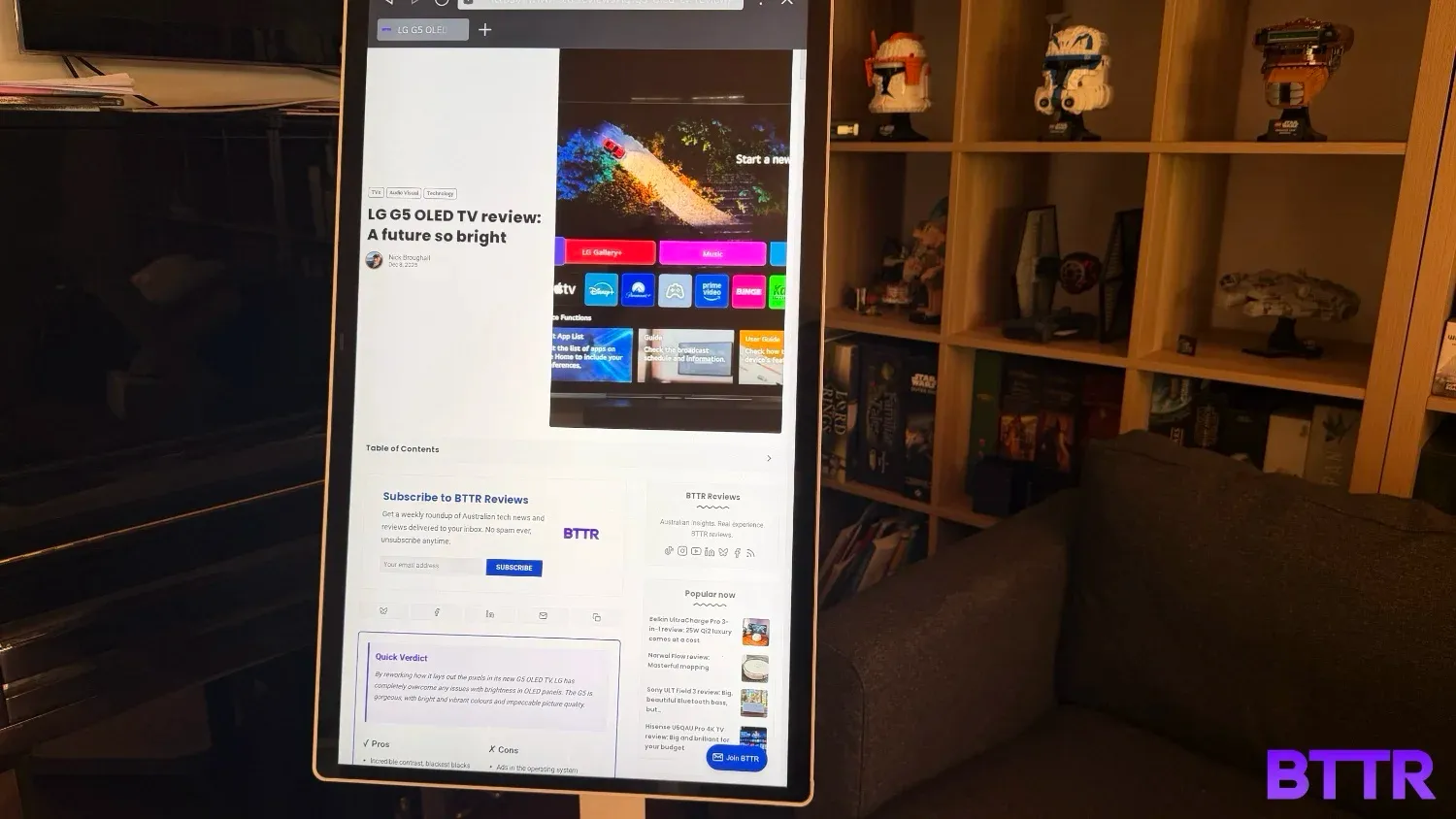
Specs
| LG Smart Monitor Swing (32U889SA-W) Product Specifications | |
|---|---|
| Display | |
| Screen Size | 31.5-inch |
| Panel Type | IPS |
| Resolution | 4K UHD (3840 x 2160) |
| Touchscreen | Yes |
| Brightness (Typical) | 350 nits |
| Colour Gamut (Typical) | DCI-P3 95% |
| Connectivity | |
| HDMI | Yes (Cable included: White / 1.5m) |
| USB-C | No |
| Thunderbolt | No |
| Features & Design | |
| Operating System | WebOS (Smart Monitor) |
| Stand Type | Rolling Stand (Flexible Stand on Wheels) |
| Stand Adjustment | Swing, Height, Tilt, Pivot (90 degrees) |
| Smart Features | ThinQ Home Dashboard, Brightness Control, Dynamic Tone Mapping |
| Included Accessories | Slim Remote Controller, Power Cord, HDMI Cable, USB A to C |
Design and build quality
The LG Smart Monitor Swing comes in two pretty large boxes, which are quite daunting when you first open them up. Fortunately, the assembly process is straightforward, and everything feels secure once it’s put together.
The stand’s base houses the power brick, and hidden cable management up the stand to connect to the monitor. The screen mounts to the stand with a secure click, so there’s no real concern that the 31.5-inch screen will fall at all.
What I really like about the whole stand design is that you can set the monitor at the position you want, and it feels nice and secure in that spot, without you having to screw or lock anything in place.
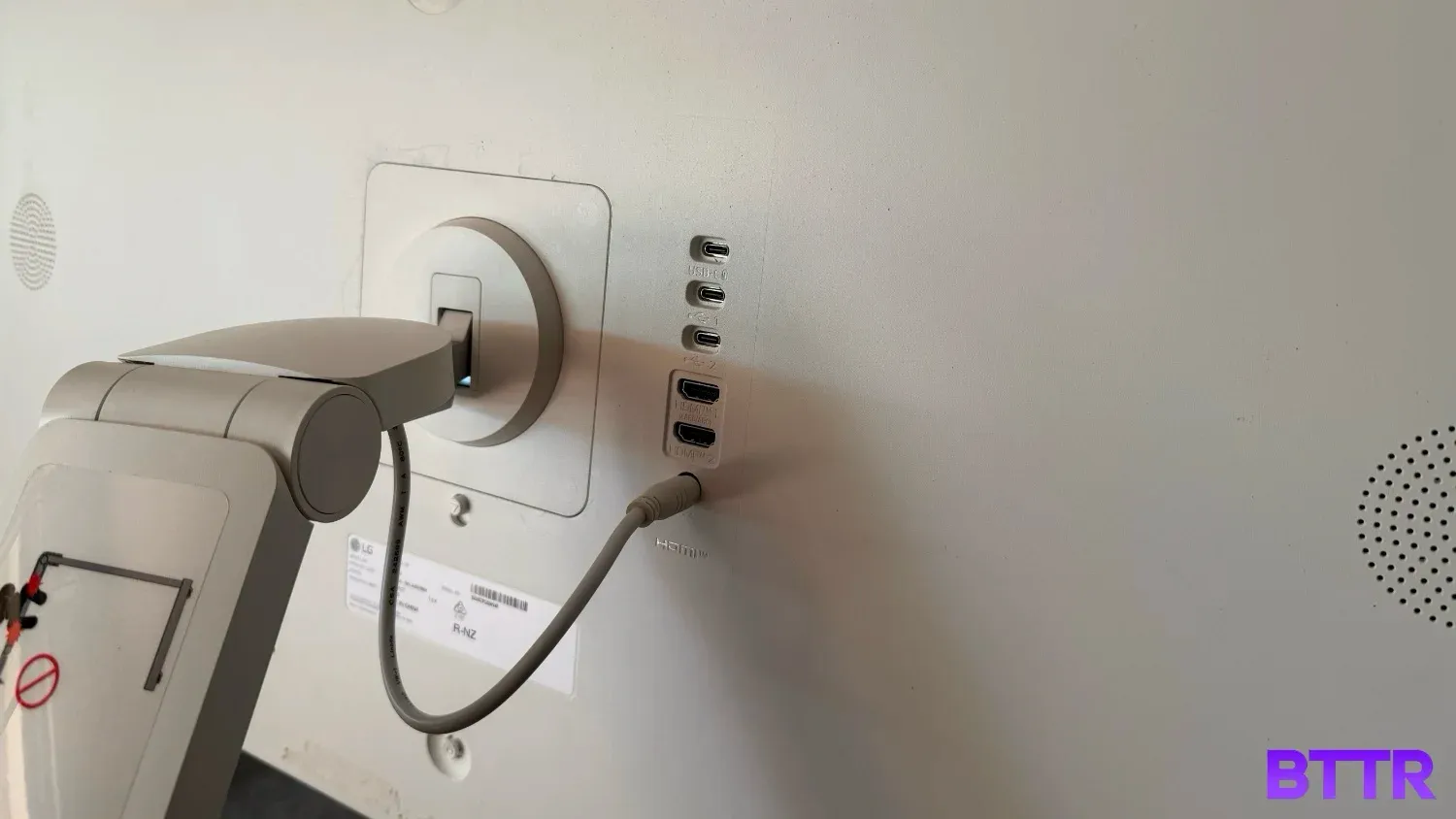
But as I mentioned above, the power cable just isn’t long enough for a screen designed to be moved around. The cable is about 1.5 metres long, which sounds like it should be plenty of length, but I can tell you that most of the locations I wanted to test the display in my home were more than 1.5 metres from a power point.
What I would love to see here is a retractable extension cable with at least 5 metres of cable to use. I’d be okay if the base was a bit taller, or a different design, to accommodate that.
As it was, I ended up just throwing the Bluetti AC2A portable charger on top of the base and plugging the screen into that when I wanted to use it. But that’s not something everyone can do.
Of course, the stand is the unique aspect of this product, but it’s still a computer monitor.
The Swing offers 4K resolution at 60 Hz. There are two HDMI ports and three USB-C ports on the back, so it’s easy to plug into your laptop or a games console. One of those USB ports outputs at 65 Watts, which should be enough to charge your phone while it's plugged in.
You also get access to LG’s webOS platform, which turns the monitor into a de facto portable TV, so long as you have a Wi-Fi connection and power. Netflix, Disney Plus, and YouTube apps provide plenty of entertainment for a computer monitor, but it’s not comprehensive: There’s no HBO Max, and no Shudder, if you wanted those platforms.
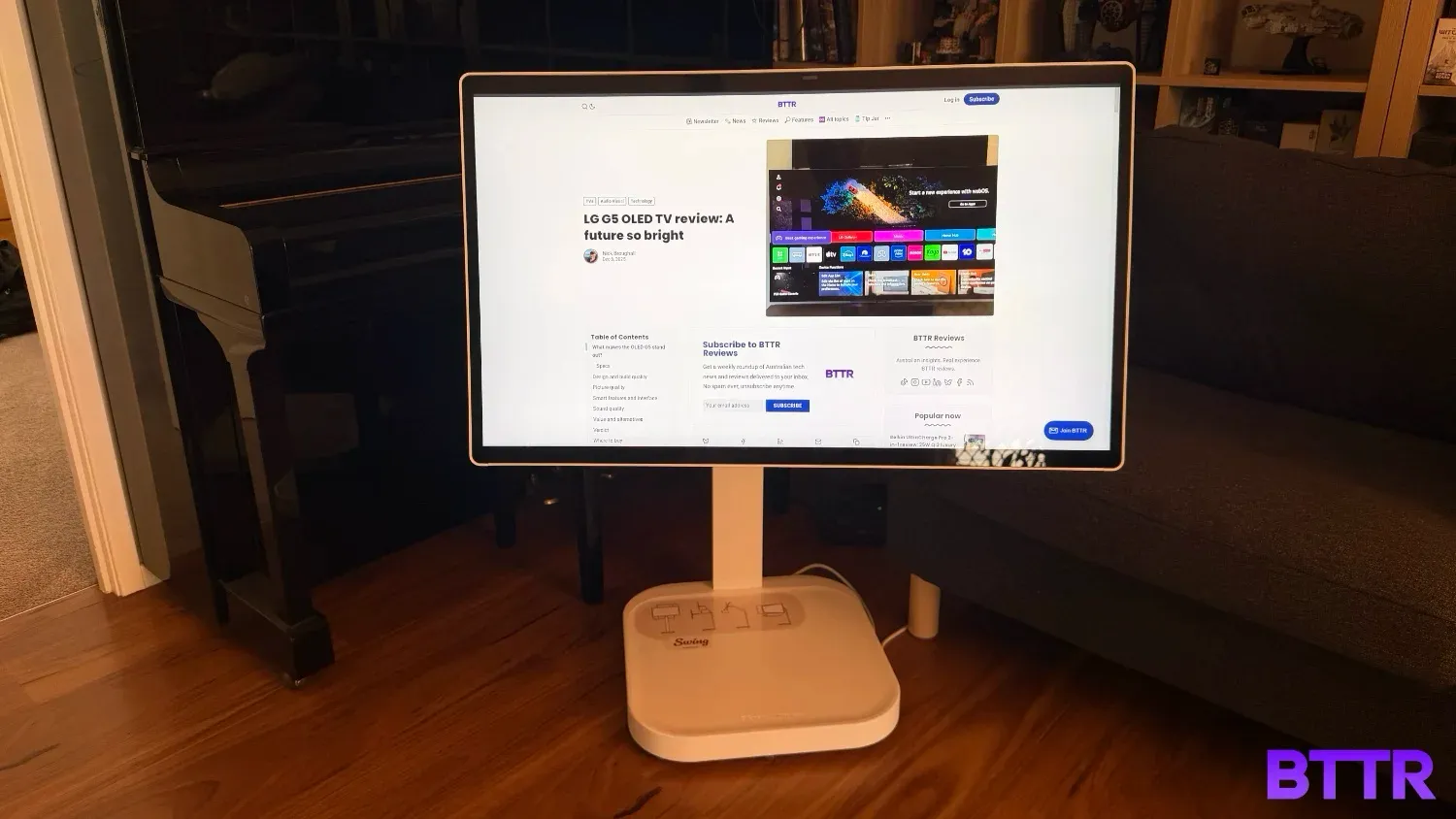
Picture quality
As a monitor with a price premium, you would expect a premium quality image. And for general use, the 4K resolution on offer is great.
Working with spreadsheets, or just using the Swing as a second display for browsing the web, the screen is solid. There’s plenty of detail in images, and video looks fine.
But the 60Hz refresh rate limits its usability for gaming. You can use it, definitely – I had some fun using the Swing to play Red Dead Redemption on the iPhone 17 Pro with the BackBone Pro and AirPlay.
But the screen isn’t fast enough to keep up with truly competitive gaming experiences. That’s not really a surprise when you think about it – it’s not what this particular device is designed for. However, it’s important to know before you hand over your cash.
I'll also note that the screen is a bit reflective. Perhaps I was spoiled by reviewing this alongside the G5 OLED which handles reflections really well, but in a brightly lit room the monitor shows a lot of reflections.

Smart features and interface
Like its premium G5 OLED evo TV, the Swing runs webOS as its smart device operating system.
And like the TV, it has the same fundamental issue: Half of the monitor’s screen real estate is taken up by ads.
For whatever reason, the ads on the monitor were much more varied than what I saw on the TV, despite reviewing at the same time. I saw ads for individual programs and movies on the monitor, and a sponsored placement for Afterpay.
Words cannot express how offensive I find the aggressive takeover of the user interface with ads on a $1,500+ device.
You can turn the ads off in the settings, which is something. But it doesn’t change the fact that half the screen is dedicated to an ad-slot. With the ads off, that space is a big picture with a little link to "Apps".
But perhaps worse than the ads is that webOS on the Smart Monitor Swing is slow. Every action has a delay of a few seconds before anything happens. Trying to adjust the settings using the touch controls is an exercise in frustration when the delay between input and action is so far between. I regularly doubted my first touch even registered, so tried again, with the monitor then trying to do two things.
Speaking of the touchscreen, while I generally liked it, the integration across apps is uneven.
You can control Netflix by using the touch interface by selecting the programs or options you see on screen, just like your mobile device.
But Paramount Plus? Touching the screen brings up a virtual D-pad you need to use to navigate around the app and make selections.
It’s messy and frustrating. I know it’s probably outside of LG’s control to have third parties integrate touch controls properly, but that doesn’t make it any more usable.
The Swing does come with a sleek little remote, but the remote on my review unit didn’t work, so I can’t say whether it’s a better UI than the touchscreen.
I will add that there’s no convenient space to store the remote with the monitor, though. It doesn’t magnetically attach to the stand, or the back of the panel. It seems like an afterthought.
Sound quality
The speakers are terrible. There’s no getting around that fact – you should avoid using them if you can help it. The sound is tinny and thin, with no real bass. It also struggles with volume – you need to have it up around 50 to be able to hear it at all.
Fortunately, it’s easy to pair Bluetooth headphones to the monitor if you want to stream TV or movies, or if you’re plugged in to your laptop you can simply use your computer’s sound system.
Value and alternatives
The Smart Monitor Swing is designed for a very particular purpose: a large screen monitor that can easily be moved between rooms and positioned in a range of heights and directions.
Because of its niche audience, the RRP of $1,699 is difficult to argue with. Its biggest competitor — honestly — is the LG StanbyME 2 portable TV, which has an RRP of $2,199, an integrated battery, and a slightly smaller panel at 27 inches.
If you were considering this as a versatile bedroom TV or something similar, I’d recommend opting for the StanbyME, even though I haven’t tested it. The power cable length is extremely limiting here, and the webOS UI just doesn’t feel right in this device.
If you need a truly portable external monitor, the Espresso Displays 15 Pro is a powerful option that lacks size comparatively, but makes up for it in simplicity and portability.
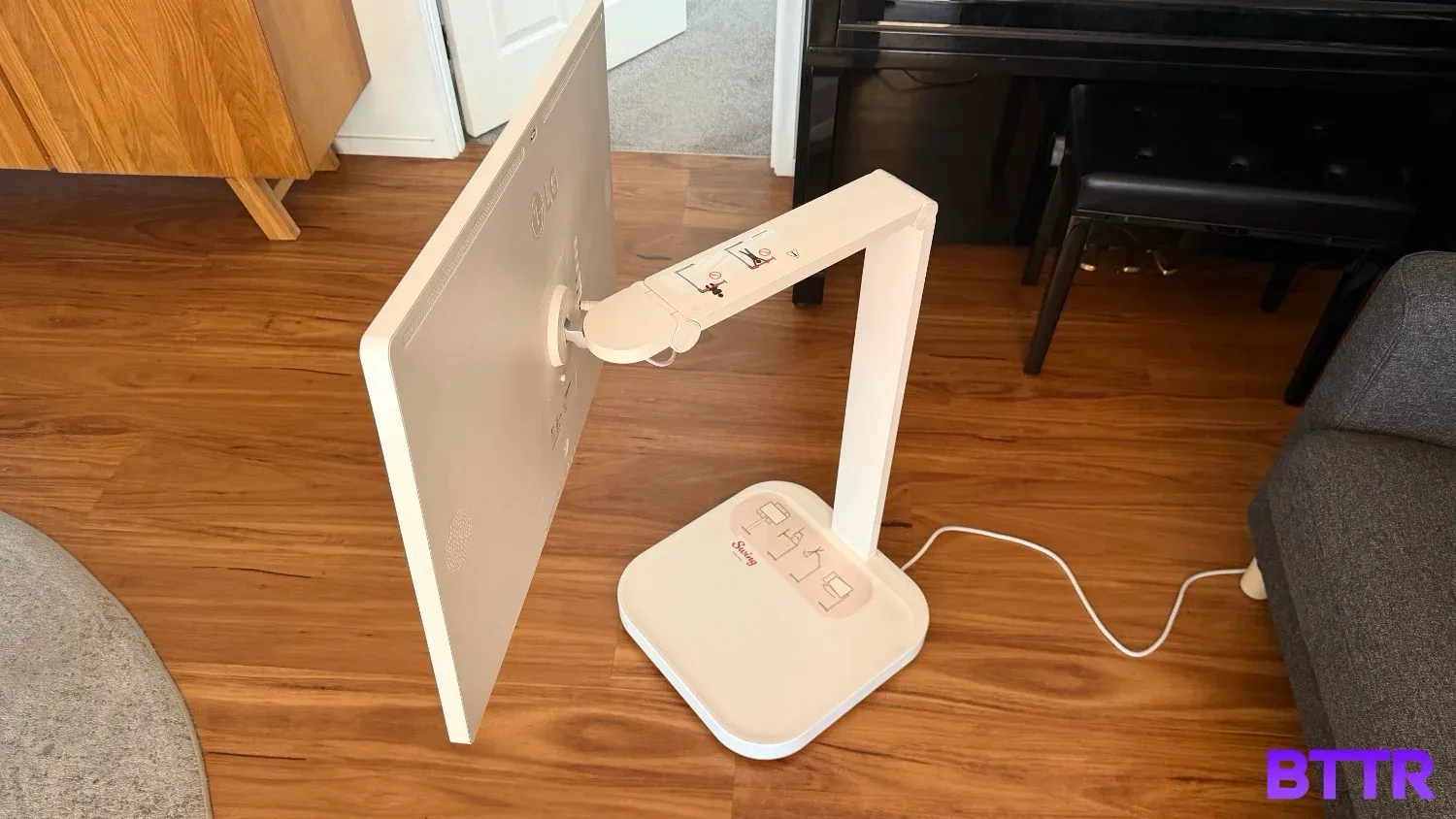
Verdict
I think LG is onto something with the design of the Smart Monitor Swing, but I don’t think the execution here is quite right.
The power cable is too short to give the monitor the real versatility it cries out for. You can work around it with an extension cable, but it would be better if LG just solved it in the product’s design.
A bigger challenge arguably is webOS - or at least the monitor's processor's lack of power to run webOS.
It’s slow, dedicates half its home page real estate to ads, and has no consistency with the touch user interface in third-party apps. If including touch controls is important, then mandate their inclusion with third-party developers to create a consistent experience.
Overall, I’m moderately disappointed by the actual Swing product, but if LG can iron out the kinks, then the second generation model has the potential to be great.
Buy the LG Smart Monitor Swing if:
- You’re looking for a good-sized monitor you can move around your home or office
- You have plenty of power points or are happy using extension cables
- You’re not really after the smart features
Skip the LG Smart Monitor Swing if:
- You want something truly portable
- You need 120 Hz (or higher) refresh rates for 4K gaming
- You ethically object to ads in your products operating system
Where to buy
The LG Smart Monitor Swing is available now for $1,699 RRP.
Latest monitor deals
Frequently Asked Questions
Is the LG Smart Monitor Swing a standard computer monitor or a smart television?
The LG Smart Monitor Swing is an all-in-one entertainment and productivity display. While it functions as a premium 4K UHD IPS monitor when connected to a PC, it features the integrated webOS platform, allowing it to operate as a smart TV for streaming and home office tasks without an external computer.
What is the unique Swing stand feature, and how does it affect the monitor's mobility?
The unique "Swing" stand is a highly flexible, wheeled base that allows the monitor to be easily moved from room to room, adapting the display for use in the kitchen, office, or living area. The stand offers ergonomic adjustments, including height, tilt, swivel, and the ability to pivot the screen into portrait mode.
What operating system is used for the smart features and streaming apps?
The monitor runs on LG's webOS 24, the same powerful platform found in LG's smart televisions. This operating system provides direct access to all major streaming services (like Netflix and YouTube), cloud gaming portals, and the LG ThinQ Home Dashboard for controlling connected smart devices.
What are the primary connectivity ports, and does it charge a connected laptop?
The Smart Monitor features comprehensive connectivity, including two HDMI ports and three USB-C ports. Crucially, one of the USB-C ports supports Power Delivery up to 65W, allowing you to connect a compatible laptop for video, data transfer, and simultaneous charging via a single cable.
Can the LG Smart Monitor Swing screen be rotated for vertical viewing (Portrait Mode)?
Absolutely. Thanks to the highly adjustable rolling stand, the screen can be rotated ninety degrees (Pivot) into a vertical or portrait orientation. This feature is excellent for increasing productivity when coding, working with long documents, or reviewing vertical content like social media feeds.