
The Nothing Phone (3) is a smartphone that refuses to blend in. Its polarising design and innovative Glyph Matrix make it stand out in a sea of similar-looking devices, though some features still need refinement to justify the premium price tag.
- Unique design that stands out from the crowd
- Main camera delivers great quality
- Excellent battery life gets you through the day
- Glyph Matrix controls are awkward to use
- Design won't appeal to everyone
- Essential button placement causes accidental screenshots
In a smartphone market dominated by Apple and Samsung, where flagship devices increasingly look indistinguishable from one another, Nothing has carved out a distinctive identity.
The British technology company's 2025 flagship, the Nothing Phone (3), continues that tradition with a design philosophy that's impossible to ignore. With its transparent rear panel, scattered camera array, and the new Glyph Matrix lighting system, this is a phone that demands attention.
But two years after the Phone (2), has Nothing created a device that's more than just a pretty face?
What makes the Nothing Phone (3) stand out?
The most obvious answer is the design. Nothing has doubled down on its aesthetic, and the Phone (3) is a phone that looks like nothing else on the market.
The transparent rear panel gives you a glimpse into the phone's internals, though in reality, what you're seeing is more artfully arranged components than actual functional hardware. Still, it creates a striking visual effect that makes other phones look boring by comparison.
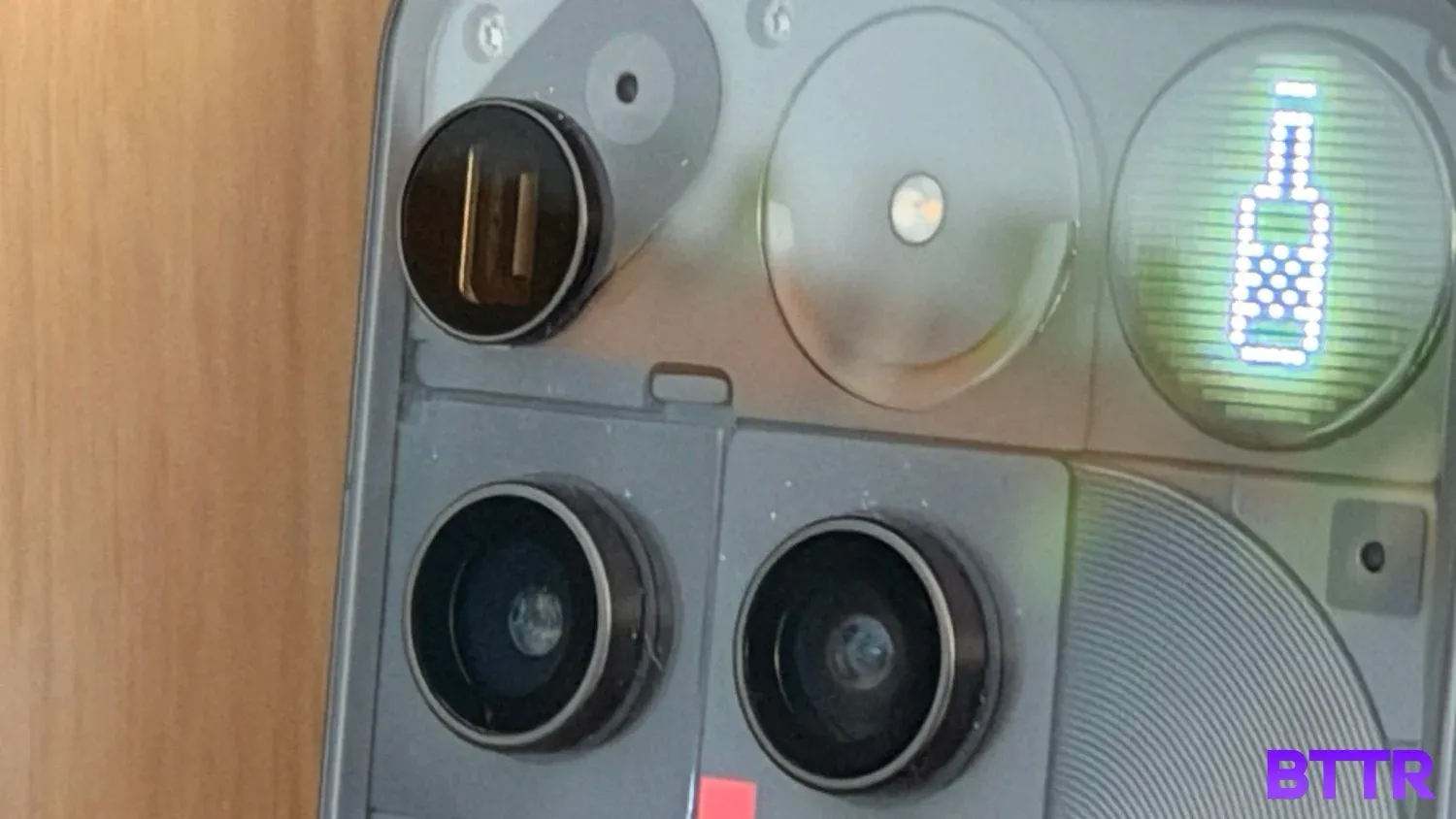
Then there's the Glyph Matrix. Nothing has evolved from the light strips on previous models to a circular grid of 489 micro LEDs in the top corner of the phone's rear.
This isn't just for show. It can display battery levels, the time, act as a notification system, and even let you play simple games like Rock, Paper, Scissors against your phone.
A touch-sensitive button on the back lets you cycle through these "Toys" and activate them. In practice, though, I found the controls a bit fiddly. You need a short press to cycle through options and a long press to activate them, which requires you to actually look at the back of your phone rather than just reaching for the control by feel.
Beyond the design flourishes, Nothing has also introduced an "Essential" button on the side of the phone that launches AI-powered productivity features. A short press takes a screenshot and lets you add notes, while a long press records a voice note with automatic transcription.
It's an interesting idea, but the button's placement next to the power button means I accidentally triggered it far more often than I intended.
Nothing Phone (3) specs
| Category | Specification |
|---|---|
| Finish | Black, White (transparent design with Gorilla Glass Victus back) |
| Capacity | 256GB (12GB RAM), 512GB (16GB RAM) |
| Display |
6.67-inch OLED 1260×2800 pixel resolution at 460 ppi 120Hz refresh rate, HDR10+ 4,500 nits peak brightness (outdoor) 960Hz PWM dimming |
| Chip |
Qualcomm Snapdragon 8s Gen 4 (4nm) Octa-core CPU (1×3.21 GHz Cortex-X4, 3×3.0 GHz Cortex-A720, 2×2.8 GHz Cortex-A720, 2×2.0 GHz Cortex-A720) Adreno 825 GPU |
| Rear Camera |
Triple 50MP system: - 50MP Main wide-angle - 50MP Ultra Wide - 50MP Periscope Telephoto (3x optical) Macro mode support |
| Front Camera | 50MP with Autofocus |
| Video Recording | 4K video recording capable |
| Power & Battery |
5,150mAh battery Fast-charge: 65W (60% in 30 mins, charger not included) 15W wireless charging Reverse wireless charging |
| Size & Weight |
Height: 160.6 mm | Width: 75.59 mm | Depth: 8.99 mm Weight: 218 grams |
| Connectivity |
USB-C Wi-Fi 7, Bluetooth 6.0, NFC 5G support (market dependent) |
| Durability |
IP68 water and dust resistance (1.5m depth for 30 mins) Gorilla Glass 7i front, Gorilla Glass Victus back Aluminium frame |
| Special Features |
Glyph Matrix (489 micro LEDs on rear) Essential button for AI features Essential Space app with voice transcription (300 mins/month) 7 years security updates, 5 years OS updates |
Design and build quality
From the front, the Nothing Phone (3) looks like any other premium Android flagship. The 6.67-inch AMOLED display is surrounded by slim bezels, and there's nothing particularly unusual about the layout.
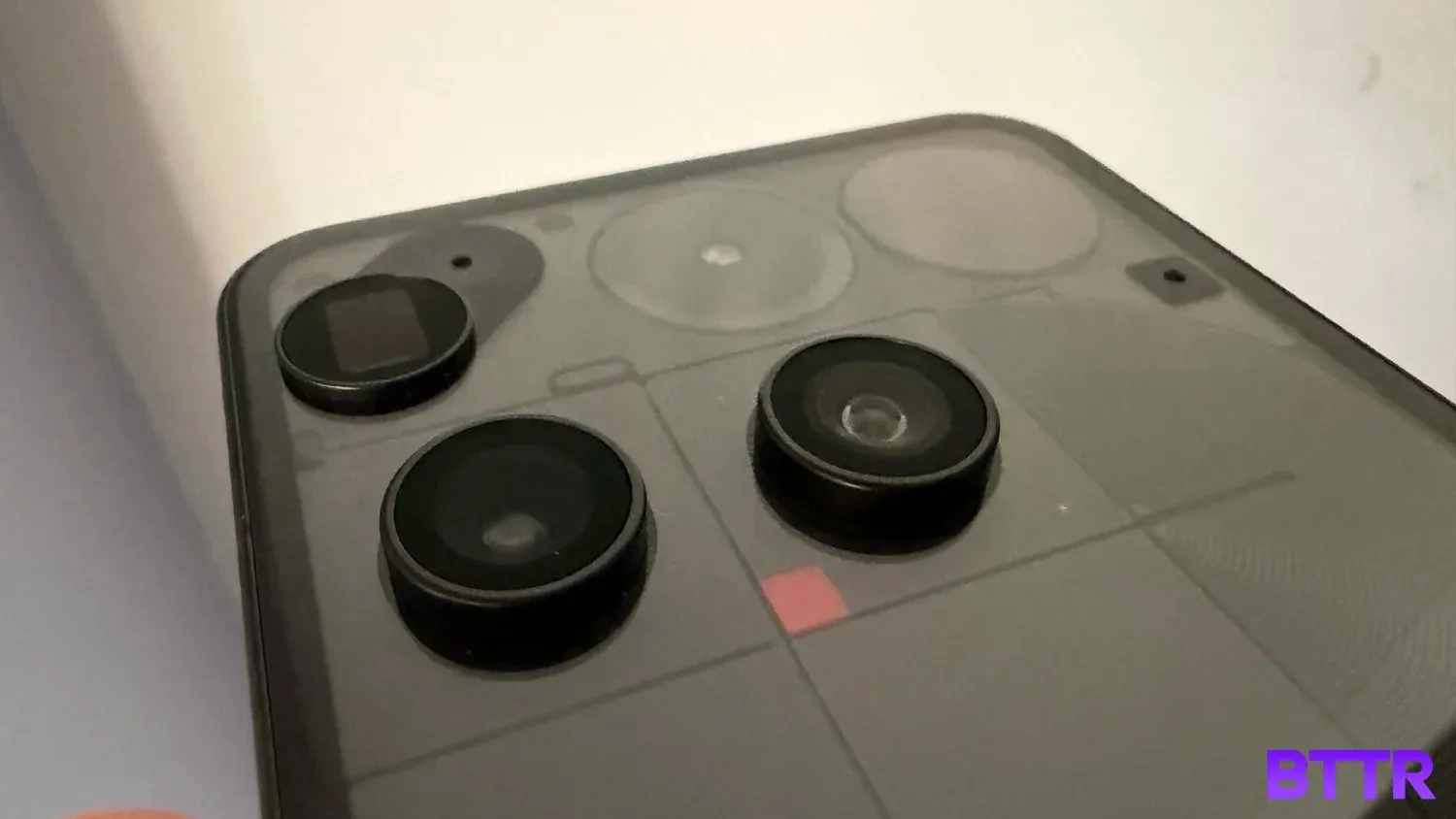
Flip it over, though, and you're confronted with Nothing's design ethos in full force. The transparent rear panel reveals a wave block pattern underneath, creating a visual texture that's far more interesting than the flat glass or metal backs you'll find on most competitors.
The camera placement is... unconventional. Three 50MP lenses are spread across the back – wide-angle, ultra-wide, and periscope telephoto – but they're not aligned in the neat rows or clusters you'd expect. The periscope lens sits off to the side, creating an asymmetrical look that's either charmingly quirky or frustratingly haphazard, depending on your perspective.
To be honest, the misalignment bothered me. I appreciate that Nothing is trying to be different, but there's a difference between deliberate design choices and chaos. This felt more like the latter.
The Glyph Matrix itself is visually striking. The circular grid of 489 micro LEDs can display various patterns and information, and when it lights up, it's genuinely cool to look at. The problem is that interacting with it feels clunky. The touch-sensitive button requires different press lengths for different actions, and it's positioned in a way that's not particularly intuitive.
I'll point out that the transparent back is a fingerprint magnet. If you care about keeping your phone looking pristine, you'll be wiping it down constantly, or putting it in a case.
The phone feels solid in the hand, though, and the IP68 water resistance rating means you don't have to baby it around water or dust.
Display performance
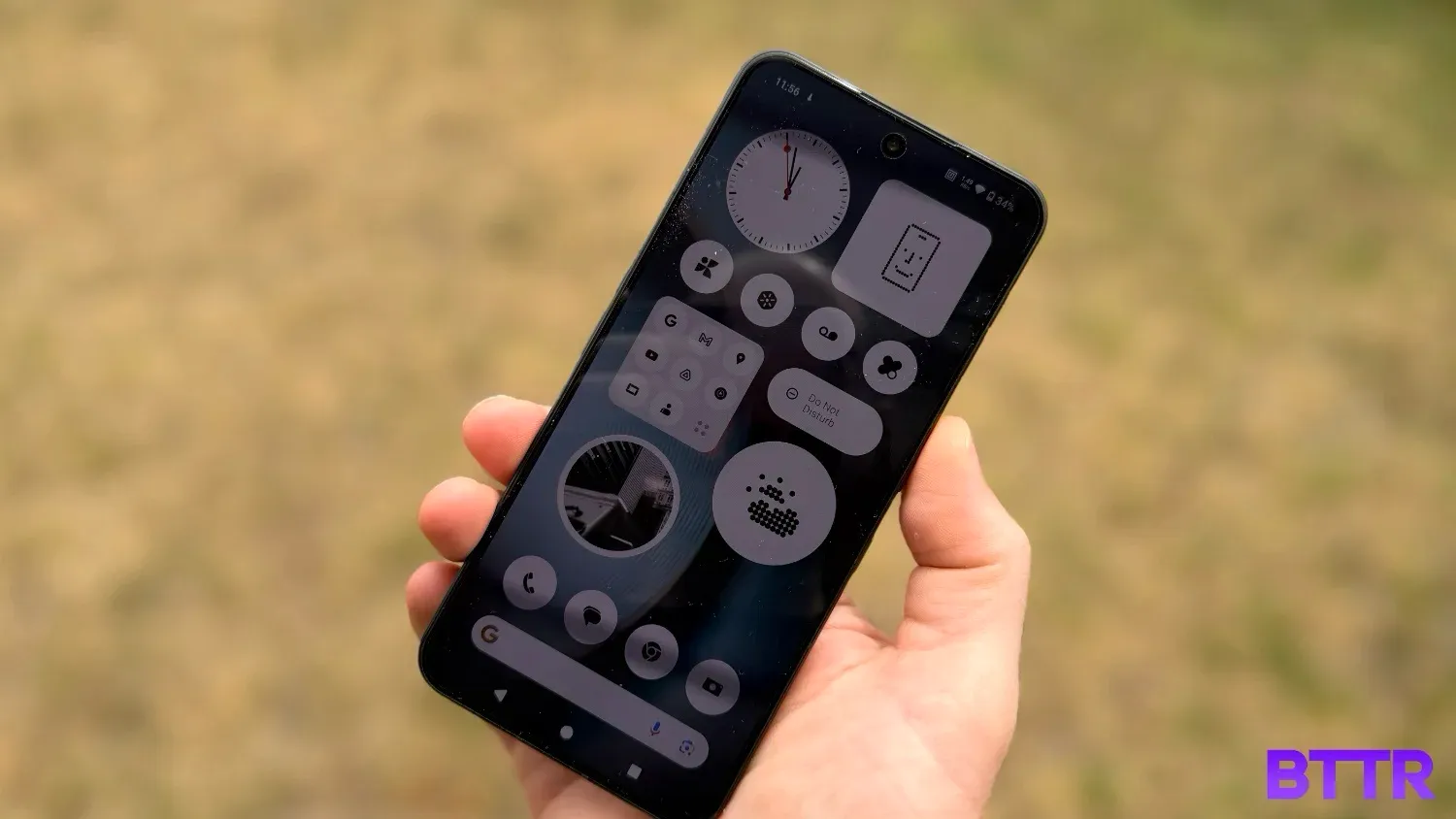
The 6.67-inch AMOLED display on the Nothing Phone (3) is excellent. With a resolution of 1260×2800 pixels and 10-bit colour reproduction, it delivers vibrant, detailed images whether you're browsing social media, watching videos, or gaming.
The 120Hz refresh rate makes everything feel smooth and responsive, from scrolling through apps to playing games. And with a peak brightness of 4,500 nits, the screen remains easily readable even in direct sunlight.
Colours are punchy without being oversaturated, and the display does a great job with HDR content. Watching Netflix or YouTube on this screen is a genuinely pleasant experience.
What I particularly appreciated was how well the display performed outdoors. Even in bright Sydney sunshine, I never found myself squinting at the screen or hunting for shade to check my messages.
Nothing hasn't reinvented the wheel here, but they've delivered a display that's competitive with the best Android flagships on the market.
Camera performance
The camera setup on the Nothing Phone (3) might look chaotic, but the results are impressive.
All three rear cameras use 50MP sensors, which gives you a lot of flexibility. The main wide-angle lens handles most everyday photography duties with ease, delivering good detail and colour accuracy in a variety of lighting conditions.
The ultra-wide lens is great for landscape shots or when you need to fit more into the frame, and the periscope telephoto lens adds genuine versatility for zoom photography. The macro mode also produces nice results when you want to get up close with small subjects.
In good lighting, the Phone (3)'s cameras compete well with other flagship devices. Photos have plenty of detail, colours are vibrant without being unrealistic, and the dynamic range is solid.







The shutter speed isn't always as quick as I'd like, particularly with moving subjects. If you're trying to photograph kids or pets, you'll occasionally miss the moment as the camera takes an extra beat to capture the shot. It's not a dealbreaker, but it's noticeable.
The 50MP front-facing camera is more than adequate for selfies and video calls, delivering sharp images with good colour reproduction.
One quirk: the default camera shutter sound is exceptionally annoying. Thankfully, it's easy to disable in the settings, which is the first thing I did.
Performance and software
The Nothing Phone (3) runs on Qualcomm's Snapdragon 8S Gen4 processor, paired with either 12GB or 16GB of RAM, depending on which storage configuration you choose.
In real-world use, the phone handles everything I threw at it without breaking a sweat. Apps launch quickly, multitasking is smooth, and I never experienced any lag or stuttering during normal use.
But from a benchmarks perspective, things are a little underwhelming. I know benchmarks aren't actually an indication of a phone's real-world performance, but for a device that costs $1,509 RRP, I thought I'd see higher numbers for this phone.
(That said, the phone has been reduced to $999 over the Black Friday and Boxing Day sale periods, which makes these scores seem much better in context).
Nothing's software is relatively clean, running on top of Android with some custom additions for the Glyph Matrix and Essential button features. You get seven years of security updates and five years of OS updates, which is reassuring for long-term owners.
The AI features accessed through the Essential button are interesting, if not entirely essential. The automatic transcription of voice notes works well, and the AI summary feature for recordings is genuinely useful if you're recording meetings or interviews (you get 300 minutes a month of AI analysis).
The "Essential Space" where all your recordings and screenshots are stored is supposed to use AI to automatically organise everything, though in practice, it's not dramatically different from a well-organised folder system.
Battery life and connectivity
The 5,150mAh battery in the Nothing Phone (3) is genuinely impressive. In my testing, I consistently made it through a full day of use without needing to reach for a charger.
Even on days when I was using the phone heavily – lots of camera use, gaming, video streaming – I'd still have battery to spare by evening. That's reassuring if you're someone who forgets to charge overnight or if you're out for an extended day without access to power.
The 65W fast charging is an excellent inclusion for when you do need to top up, though it's worth noting that Nothing doesn't include a 65W charger in the box. If you want those faster charging speeds, you'll need to buy one separately. The phone also supports 15W wireless charging, which is convenient if you already have a wireless charging pad.
Connectivity-wise, you get all the modern standards: Wi-Fi 7, Bluetooth 6.0, and NFC. In my time with the phone, I never experienced any connectivity issues.
Verdict
The Nothing Phone (3) is a phone that will evoke an opinion within seconds of being seen. That distinctive design is polarising: there's no middle ground between loving it and hating it.
If you're in the "love it" camp, there's a lot to appreciate here. The cameras are genuinely good, the battery life is excellent, and the performance is more than adequate for everything you'd want to do with a smartphone. Nothing's commitment to seven years of security updates also means this phone should serve you well for years to come.
The Glyph Matrix and Essential button are interesting ideas that show Nothing is willing to experiment with new features. Right now, though, they feel like they're still finding their purpose. The Glyph Matrix "Toys" are fun novelties rather than must-have features, and the Essential button's placement makes it more of an annoyance than a productivity boost.
At $1,509 for the base model, the Nothing Phone (3) isn't cheap. You're paying a premium for that distinctive design and for a phone that refuses to blend into the crowd. Whether that premium is justified depends entirely on how much you value standing out from the sea of identical-looking smartphones.
For me, I appreciate what Nothing is trying to do. In a market where most flagships are iterative updates that look and feel like last year's model, the Phone (3) at least dares to be different. But "different" doesn't automatically mean "better," and some of Nothing's choices feel like style over substance.
Buy the Nothing Phone (3) if:
- You want a phone that doesn't look like every other flagship
- You value strong battery life and solid camera performance
- You're intrigued by the Glyph Matrix and want to be part of Nothing's evolving ecosystem
Skip the Nothing Phone (3) if:
- You prefer more conventional smartphone designs
- You're frustrated by features that feel half-baked
- You want the absolute best camera system and don't mind paying extra for it
Where to buy
The Nothing Phone (3) is available in Black and White colour options, with two storage configurations:
| Storage Option | RAM | RRP (AUD) |
|---|---|---|
| 256GB | 12GB | $1,509.00 |
| 512GB | 16GB | $1,689.00 |
Frequently Asked Questions
What is the Glyph Matrix on the Nothing Phone (3)?
The Glyph Matrix is a circular grid of 489 micro LEDs on the rear of the phone that can display information like battery life and time, act as a notification system, or run interactive "Toys" like Rock, Paper, Scissors. It's controlled by a touch-sensitive button on the back of the phone.
How long does the Nothing Phone (3) battery last?
With its 5,150mAh battery, the Nothing Phone (3) consistently delivers a full day of use under typical conditions. Even with heavy use including gaming, camera work, and video streaming, the phone should make it through to the evening with battery to spare.
Does the Nothing Phone (3) come with a fast charger?
No, the Nothing Phone (3) doesn't include a charger in the box. While it supports 65W fast charging, you'll need to purchase a 65W charger separately to take advantage of these speeds. The phone also supports 15W wireless charging.
What software updates will the Nothing Phone (3) receive?
Nothing is committed to providing seven years of security updates and five years of OS updates for the Phone (3), which means the device should receive software support well into the 2030s.
How does the Essential button work?
The Essential button is located on the side of the phone. A short press takes a screenshot that you can annotate with notes, while a long press records a voice note with automatic transcription. When the phone is placed face-down, a long press activates recording mode, with the Glyph Matrix displaying the audio waveform.