

BTTR is independent. We may earn a commission if you buy through our links.
Why trust us? | How we test
There are a lot of pundits and talking heads on the Internet who like to take shots at Apple's "slow" approach to AI.
But I think the announcement today that it's rolling out new and improved accessibility features thanks to Apple Intelligence is a great example of what a measured approach to the technology looks like.
For the most part, AI features on tech devices have been... well, slop. When the "best" thing you can do with AI on a phone is create terrible cartoon images, the tech starts looking like a solution in search of a problem.
But this is actually useful.
Apple has previewed a suite of accessibility updates coming later this year that use Apple Intelligence to enhance VoiceOver, Magnifier, Voice Control and Accessibility Reader, alongside two new features: generated subtitles and power wheelchair control via Apple Vision Pro.
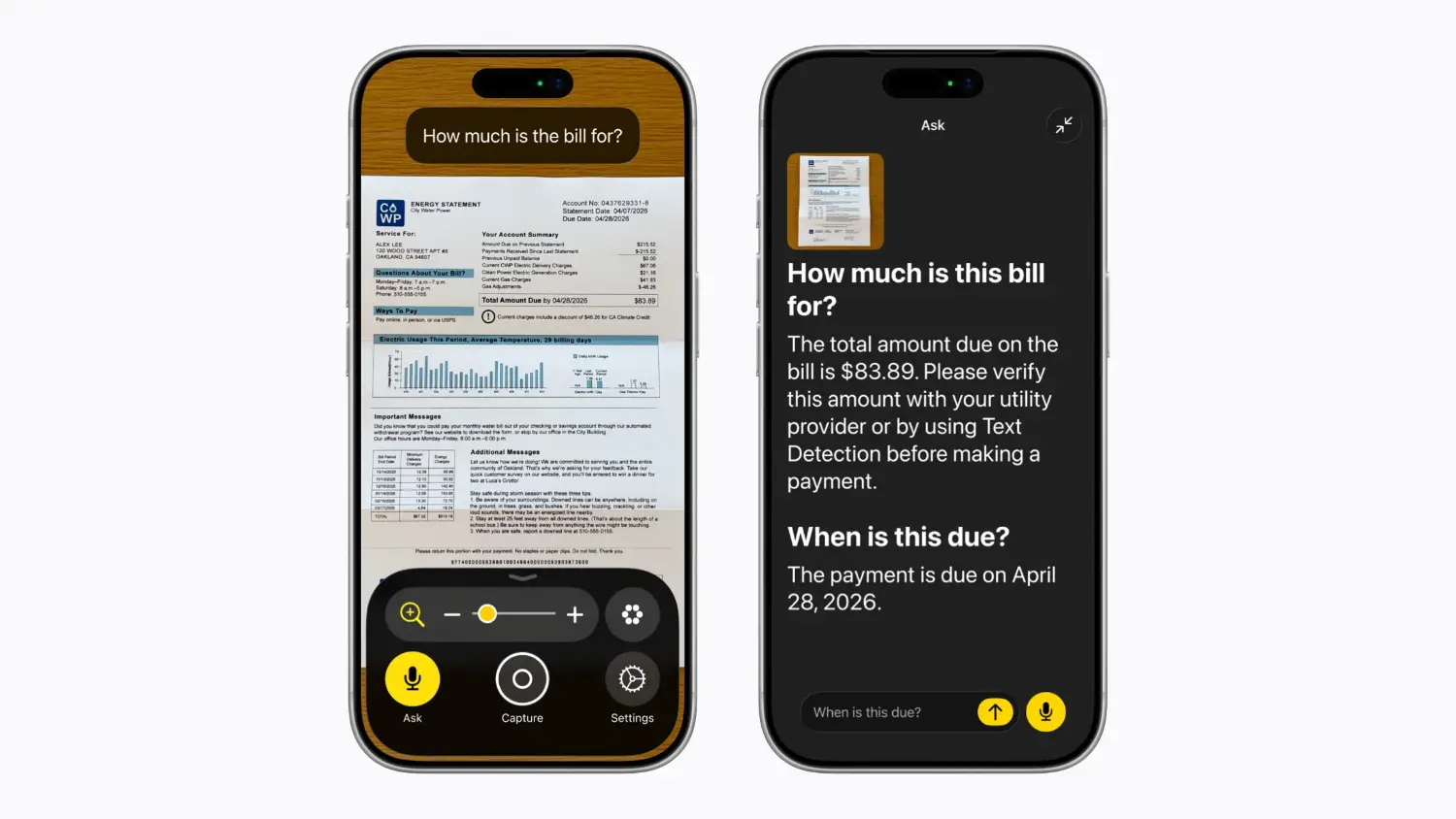
For users who are blind or have low vision, VoiceOver gets a new Image Explorer that provides detailed descriptions of photos, scanned bills and other visual content.
Users can also press the Action button on iPhone to ask questions about what's in the camera viewfinder and get a detailed response in natural language, with the option to ask follow-up questions.
Magnifier gets a similar treatment, with Apple Intelligence-powered descriptions in a high-contrast interface designed for low-vision users.
Voice Control is arguably the most welcome upgrade. Rather than memorising exact button labels or numbers, users can describe what they see on screen in plain language.
Want to open a folder? Say "tap the purple folder." Need to navigate Apple Maps? Try "tap the guide about best restaurants." For anyone who relies on Voice Control, removing the need to memorise an app's exact interface language is a meaningful step forward.
Accessibility Reader, which serves users with dyslexia and low vision, can now handle complex layouts like multi-column scientific articles. On-demand summaries give readers an overview before diving in, and built-in translation lets users read content in their native language while keeping their preferred fonts and colours.
Sarah Herrlinger, Apple's senior director of Global Accessibility Policy and Initiatives, said the changes were designed with privacy at the centre. "With these updates, we're bringing new, intuitive options for input, exploration and personalisation, designed to protect users' privacy at every step."
There are a couple of new features too: Firstly, generated subtitles that use on-device speech recognition to transcribe uncaptioned video content across iPhone, iPad, Mac, Apple TV and Apple Vision Pro.
The feature launches in English in the US and Canada, with broader rollout presumably to follow.
Second, a power wheelchair control feature for Apple Vision Pro that uses the headset's precision eye-tracking system to steer compatible wheelchairs for users who can't operate a joystick.
The feature launches with Tolt and LUCI alternative drive systems. If you want a clear answer to why Vision Pro exists at $5,999, this is a pretty good one.
Pricing and availability
The software accessibility updates are coming later in 2026 as a free update for Apple Intelligence-supported devices.
Voice Control powered by Apple Intelligence will be available in English in Australia. Generated subtitles are launching in English in the US and Canada only, with no confirmed timeline yet for Australian support.
Latest technology deals