

BTTR is independent. We may earn a commission if you buy through our links.
Why trust us? | How we test
Parental controls is a deeply underdeveloped feature of all operating systems. Having raised my kids to survive through to their mid-teenage years (so far!), I can tell you that managing screen time is a legitimate struggle while also trying to empower your kids to make good choices.
So I'm all for Apple's improved parental controls announced at WWDC overnight alongside the new Siri AI. It's not a perfect solution, but it's definitely a step forward.
The updates, coming to iOS 27, iPadOS 27, and macOS 27 later this year, are built around the idea that parents should have more precise control over what their kids see, who they talk to, and when they get to use their device at all.
The biggest change is to how you get a child started on a device. When setting up a new iPhone or iPad for a kid, parents can now choose exactly which apps appear on it from the start, starting with just a few essentials and adding more over time.
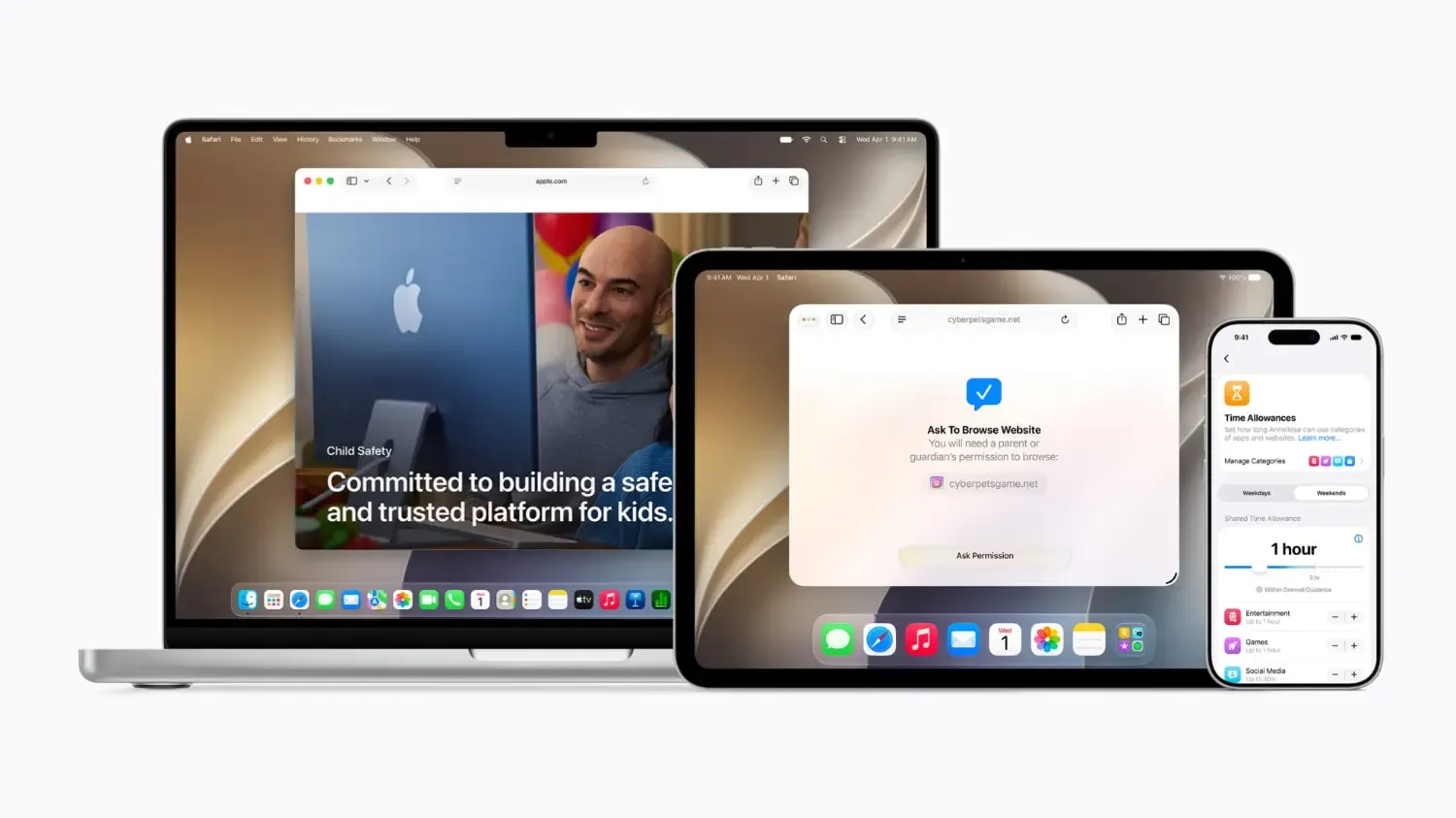
Ask to Browse works just like Ask to Buy but for browsing the web on Safari, meaning kids need parental approval before visiting a new website. For parents of younger kids especially, this is a welcome addition. Combined with Apple's existing content filters, it closes a gap that was previously pretty easy to work around.
On the communication side, parents can already restrict who kids can message or call, but Apple is now extending Communication Safety to flag gore and violent imagery, not just nudity. It was already turned on by default for under-18 accounts, and this expansion is a sensible one.
As a parent of older kids, the improvements to Time Allowances is probably the most important change for me, though. It gives parents more granular control over categories like Games, Entertainment, and Social Media.
It also offers suggested time limits based on age and expert guidance from groups like the American Academy of Paediatrics.
You can also set daily Schedules to block app categories during school hours or at the dinner table without having to fiddle with settings each time.
Screen Time itself has been redesigned and is noticeably cleaner, with an at-a-glance view of your child's usage and quick controls to extend or restrict access on the fly.
Sumbul Desai, Apple's vice president of Health and Fitness, said the tools are "grounded in the belief that every child is unique," adding that the goal is to let parents tailor their child's digital journey rather than apply a one-size-fits-all approach.
None of this is a silver bullet. The most effective digital parenting still happens in conversation, not just in a settings menu. But having better tools to back those conversations up? I'll take it.
The new child safety features are a free software update and will be available as part of iOS 27, iPadOS 27, and macOS 27, expected to arrive in Australia in spring 2026.
Compatible iPhones, iPads, and Macs will receive the update automatically. There's no separate download or additional cost.
Latest software deals