

BTTR is independent. We may earn a commission if you buy through our links.
Why trust us? | How we test
There are lots of things to consider when buying a TV, from backlight technology to price tag. But size is the easiest part of the equation to get right.
Many people buy a TV that's too small for their room, sit down to watch it, and wonder why it doesn’t feel as immersive as it did in the shop.
Others go the other way and oversize for the space, and end up with eye strain or a screen that oppressively dominates the room.
Both mistakes come from skipping a pretty simple calculation: the relationship between your screen size and how far away you're sitting from it.
Here’s what you need to do to find the right TV for your room.
Why "bigger is better" isn't always true
I’ve tested 115-inch TVs, and the desire to just watch your favourite movies on the biggest screen is palpable. But it’s generally not the right choice.
It’s a bit like reading a book. Hold a novel too close to your face and the words blur together. Hold it too far away, and you have to squint to make out what’s on the page.
There's a sweet spot where reading is easy, and it's the same idea with a TV, just at a much bigger scale.
A screen only gets more immersive as it gets bigger, up to the point where the image still resolves properly for your eyes at your seating distance.
Past that point, you're not getting a more cinematic experience, you're just looking at a bigger rectangle.
Worse, depending on the panel and the content, you might start noticing things a smaller screen at the same distance would hide, like compression artefacts in a bad stream, uneven backlighting, or motion judder during sport.
The distance-to-size ratio
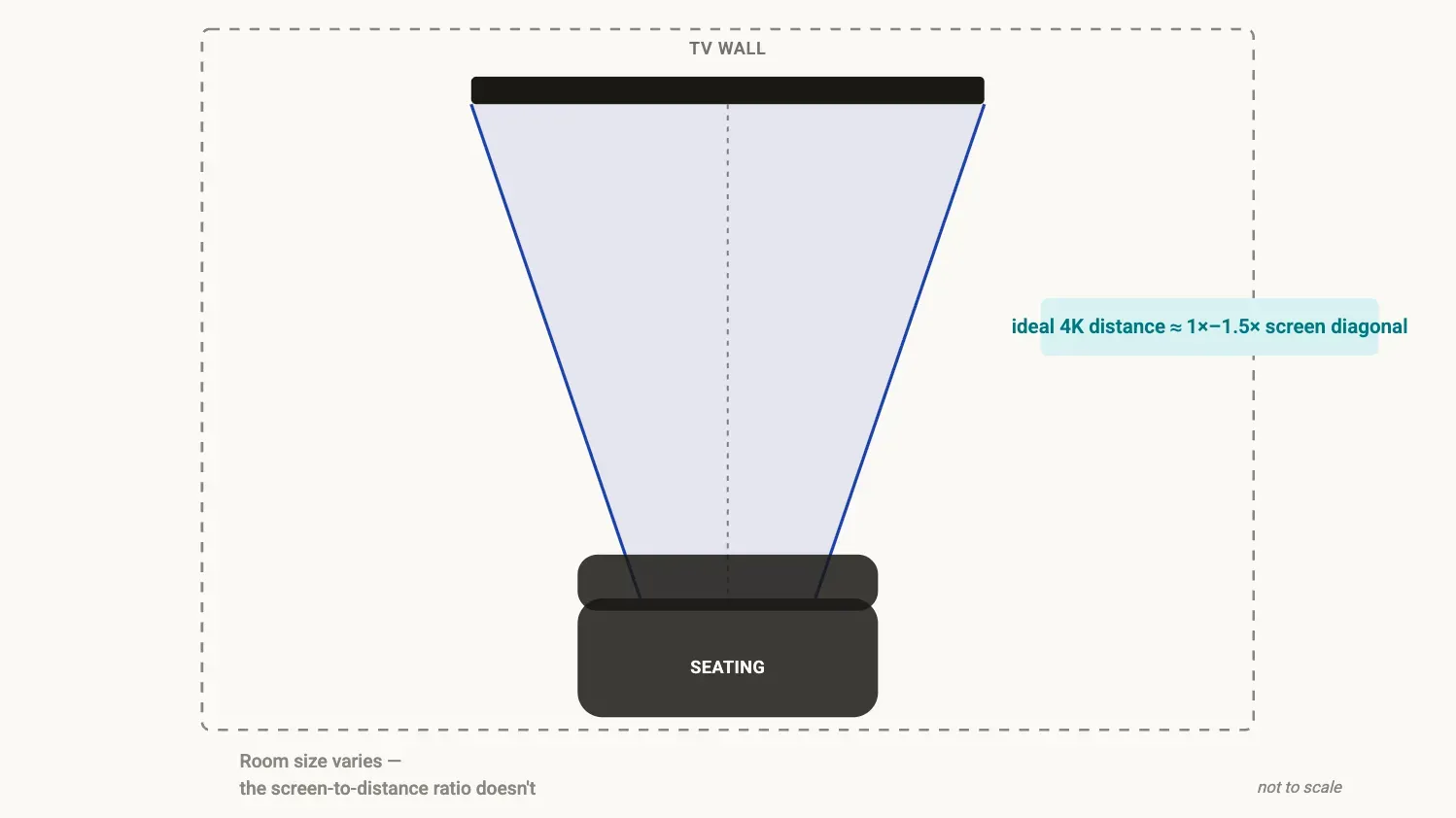
Here's the rule for sizing a TV to a room.
For a 4K TV, you want to sit somewhere between 1 and 1.5 times the screen's diagonal size away from it. That means for a 65-inch TV, you want to sit roughly 1.65 m to 2.5 m away.
Where does that range come from? It's the point at which most people’s eyes can just resolve individual pixels on a 4K panel.
Sit closer, and you risk seeing pixelation or a slight screen-door effect on some content. Sit further than the high end, and you're not really benefiting from the extra resolution over a 1080p set, you may as well have bought something smaller.
For 4K TVs, this is noticeably closer than the old rule of thumb for 1080p TVs, which had you sitting back 1.5 to 2.5 times the diagonal.
4K crams four times as many pixels into the same space, so you can sit closer without your eyes noticing the individual dots.
That's the real reason TVs have crept up in size over the past decade, while the average Australian lounge room hasn't grown to match.
Quick reference by screen size
| Screen size | Ideal 4K viewing distance | Minimum comfortable distance |
|---|---|---|
| 43" | 1.1m – 1.6m | 0.9m |
| 50" | 1.3m – 1.9m | 1.0m |
| 55" | 1.4m – 2.1m | 1.1m |
| 65" | 1.65m – 2.5m | 1.3m |
| 75" | 1.9m – 2.9m | 1.5m |
| 85" | 2.2m – 3.2m | 1.7m |
| 98" | 2.5m – 3.7m | 2.0m |
Before you go shopping for a TV, measure the distance to the wall where the TV will go from your couch. Don't eyeball it.
Use the number you get with the table above to determine the ideal viewing distance for your room. Then start searching for the best deal on a TV at that size.
Remember, most sales staff won't help guide you on this because their job is to sell you whichever size is on special this week, not the one that suits your room.
It's about field of view, not just resolution
The reason a bigger TV feels more immersive isn't purely about pixel count. It's about how much of your peripheral vision the screen fills.
Once a screen occupies roughly 30 to 40 degrees of your horizontal field of view, your brain starts treating it less like a window and more like you're actually in the scene. Cinemas use a version of this same logic when they size screens relative to the front rows.
That means, if you sit near the closer end of your recommended distance range, you get nearer to that cinema feeling.
Sit near the further end and the TV starts to read more like a normal household appliance again.
If you're mostly watching fast-moving sport, sitting a bit closer helps sell the immersion. If you're watching dialogue-heavy shows, or the TV doubles as background noise while you do other things, the further end of the range is easier on your eyes for a long viewing session.
Other ways the room impacts the TV experience
It’s not just about screen size, either. The room where you watch TV adds several other considerations to make when you choose a TV.
Room width and who's sitting where
A screen that's too wide for a narrow room forces anyone not sitting dead centre into an angled view. That’s where the type of panel can make a big difference.
VA-panel LCDs, which are common in budget and mid-range TVs, lose contrast and colour sharply once you're more than about 30 degrees off to the side.
IPS panels hold colour better from an angle but give up a bit of contrast even sitting straight on.
OLED holds both remarkably well, regardless of where you're sitting, which is one of the reasons it suits a wide shared lounge room.
How much light gets into the room
A bright, sun-lit living room washes out contrast on any TV, but it hits cheaper LCD panels harder because they don't get as bright.
In a sunny room, a smaller, brighter TV can look better in practice than a larger, dimmer one. Contrast, not size, is what your eye actually reads as "good picture" in daylight.
That said, modern OLEDs come with an anti-glare coating that can make a massive difference to view ability in a bright, sunlit room. If you can justify the cost, it’s well worth it for bright rooms.
Wall mounted versus a stand
Mounting a TV on the wall usually lets you push it slightly higher and further back without it looking odd next to your furniture, which can justify sizing up the screen in a smaller room.
However, a TV sitting low on a media unit under a high couch, on the other hand, can create an uncomfortable downward viewing angle if you go too big.
The mistake most people make
A 75-inch TV in a shop full of other gigantic screens looks perfectly proportionate because everything around it is also enormous.
But when you put that same TV on a single wall in a normal Australian living room, it can feel completely out of place.
Bring your measured room dimensions with you when shopping for a TV, so you get the right TV for your room.
The second mistake to avoid is upsizing just because it's an upgrade from your previous TV, without rechecking whether the new size still fits your room.
A 30% discount on an 85-inch TV isn't really a bargain if your room can't seat anyone at a comfortable distance from it.
Work out the biggest size your room can support before you start comparing prices, not after you've already fallen for the deal.
Get the best TV for your needs
So the process is simple: measure first, then let the ratio decide the size, not your gut.
A correctly sized TV on a mid-range panel will look and feel better in your actual lounge room than an oversized TV that's pushed you outside a comfortable viewing distance, no matter how good the deal looked on the shelf tag.
That said, still take the opportunity to shop around to find the best price on the right TV for your home.
Latest TV & display deals